Yerevan, 15.May.2026,
00
:
00
ՄԵՆՅՈՒ
Futsal tournament Galaxy Champions League 2024 kicks off Unibank is now a regular partner of “Pan-Armenian intellectual movement” IDBank issued another tranche of dollar bonds Green Iphone on the best credit terms at green operator's stores UCOM Provided technical assistance to Shengavit administrative district AMD 9,808,684 to the "City of Smile" Charitable Foundation. The next beneficiary of "The Power of One Dram" is known Unibank offers a “Special” business loan with an interest rate of 8.5% per annum IDBank implements the next issue of nominal coupon bonds Flyone Armenia will start operating regular direct flights Yerevan-Moscow-Yerevan New movie channels in Ucom and good news for unity tariff subscribers


5 способов узнать пароль своей Wi-Fi-сети

Lifestyle

Не знаю, как вы, а я частенько забываю пароль от домашнего Wi-Fi, и, учитывая частые эксперименты с оборудованием и гаджетами, это доставляет определённые неудобства при повторном подключении. Для таких случаев есть целых пять способов найти пароли от беспроводных сетей, к которым вы однажды подключались.

Посмотрите стандартный пароль на роутере
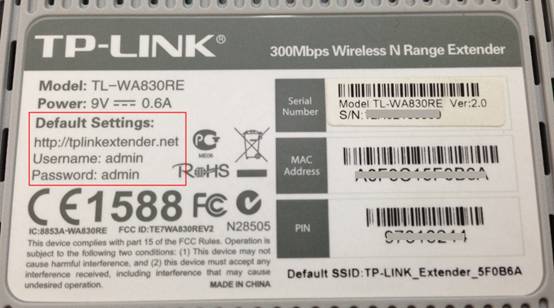
стандартный пароль wi-fi на роутере

Этот способ подойдёт для вашего личного роутера или любого другого, к которому у вас есть физический доступ. У большинства современных роутеров есть уникальное имя сети и пароль, присваиваемые по умолчанию. Обычно они печатаются на этикетке с серийным номером и прочей сервисной информацией или на специальной наклейке.

Вам остаётся только добраться до роутера и внимательно обследовать его тыльную сторону. Если там ничего нет, попробуйте заглянуть в инструкцию или погуглить модель роутера. Наверняка найдёте то, что ищете.

Узнайте пароль из настроек сети Windows

Если вы подключены (или когда-то подключались) к сети через Windows, то она любезно подскажет вам забытый пароль. В зависимости от версии Windows названия пунктов меню могут отличаться, но смысл примерно тот же.


пароль wi-fi в настройках сети Windows

Нужно перейти в «Центр управления сетями и общим доступом» и добраться до списка беспроводных сетей. Затем открыть свойства нужной сети и посмотреть пароль в поле «Ключ безопасности сети», не забыв поставить галочку на «Отображать вводимые знаки».

Посмотрите пароль в «Связке ключей» в OS X

С Mac всё точно так же. OS X хранит пароль от любой сети, к которой вы когда-нибудь подключались, и, разумеется, его можно увидеть.
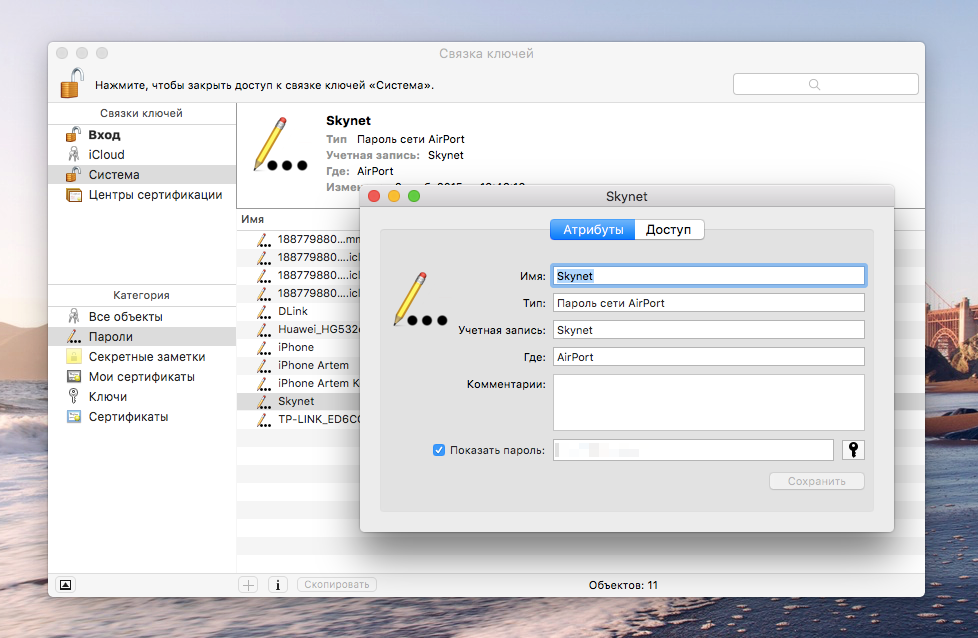
пароль wi-fi в Связке ключей на Mac

Делается это в «Связке ключей», где хранятся все ваши пароли. Запускаем её через Spotlight или из папки «Программы» и выбираем на боковой панели слева раздел «Система». Далее находим нужную сеть в списке и жмём на кнопочку «i» на панели ниже. Ставим галочку возле «Показать пароль» и после ввода пароля администратора видим наш пароль от Wi-Fi.

Найдите пароль в веб-интерфейсе роутера

Если у вас есть доступ к веб-интерфейсу, то пароль роутера можно посмотреть там. Для этого надо перейти в браузере по адресу 192.168.0.1 (или 192.168.1.1) и ввести логин и пароль. Структура меню у каждого производителя отличается, но суть в том, чтобы найти раздел Wireless Network, в котором есть пункт Security с опциями защиты. В нём и содержится наш ключ, то есть пароль беспроводной сети.
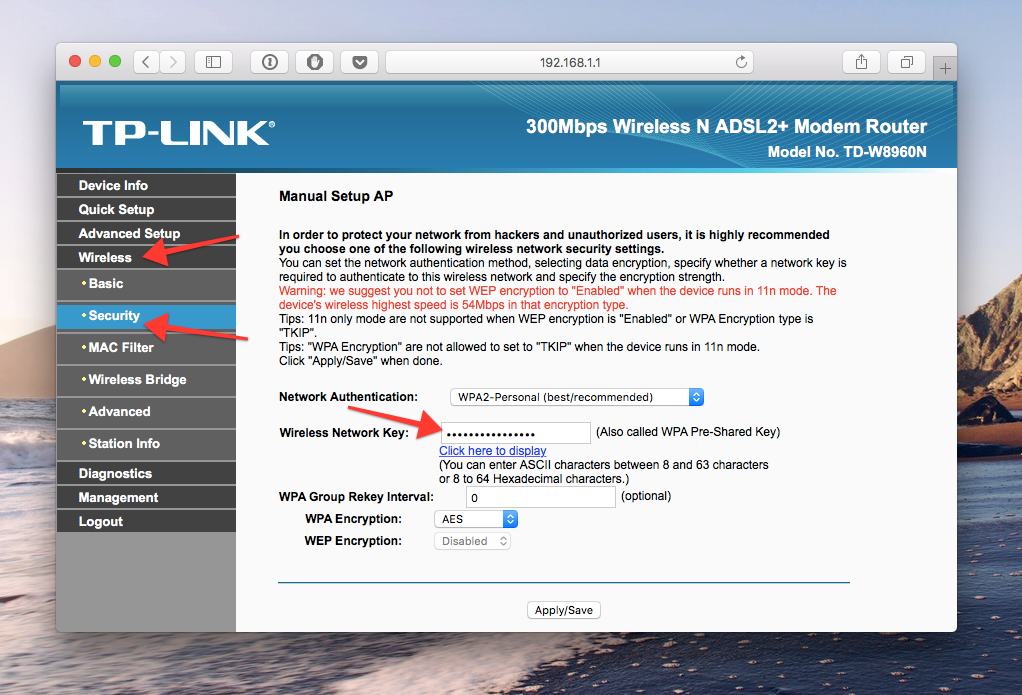
пароль wi-fi в веб-интерфейсе роутера

Выглядит необходимое нам меню примерно вот так. Пароль по умолчанию скрыт, и для его отображения нужно нажать на кнопку Display password или что-то в этом роде.

Сбросьте пароль и задайте новый

Ничто не устоит против грубой силы. Если пароль нельзя достать, значит, нужно его взломать, то есть сбросить. Этот способ годится только в случае, когда нужен пароль от вашего домашнего роутера, но сработает на абсолютно любом маршрутизаторе, поскольку у каждого из них есть физическая кнопка сброса. Единственный минус — если ваш провайдер использует специфические настройки подключения, его придётся настраивать заново.

пароль wi-fi можно сбросить

Итак, достаём роутер из шкафа, с антресолей — или где он там у вас спрятан — и внимательно смотрим на ту его часть, где расположены порты и кнопки управления. Ищите небольшое отверстие, рядом с которым написано Reset. Это и есть кнопка сброса. Её нужно нажать скрепкой или иголкой и подержать несколько секунд (если не поможет, то зажимаем reset и, не отпуская кнопки, выключаем роутер на 30 секунд, а затем, продолжая держать кнопку, включаем и отпускаем ее через 30 секунд). После этого настройки роутера сбросятся на стандартные и вы сможете узнать пароль одним из способов, описанных выше.

IDBank supports the Opening Event of Wizz Air’s “Let’s Get Lost” CampaignUnibank provided cashback to more than 2 000 reliable SME borrowers AraratBank Supports Another Successful Entry into the Capital Market“Cannot deliver your package”. IDBank warns about fake messages from ‘’HayPost’’Ucom and SunChild Continue Joint Initiatives for a Greener Future Grant Akopian has been elected to the AmCham Board Unibank was a partner of the international forum “Yerevan Dialogue” EIB Group and Ameriabank strengthen support for Armenian businesses through EU-backed guarantee The Power of One Dram to ‘’Vahe Meliksetyan’’ FoundationThe international chess tournament supported by IDBank has concludedAraratBank and Urartu Football Club Team Up to Promote Financial LiteracyFINTECH360 International Conference Held in Armenia Ucom Upgrades Internet Speed for Unity Packages Two Milestones, One Celebration: Moneytun Turns 20, Partnership with AraratBank Marks 10 YearsBell Ringing Ceremony at the London Stock Exchange marks Ameriabank’s inclusion in the FTSE 100 as part of LFG AraratBank Announces Change in Executive Leadership Brilliant Performance of Khachaturian’s Piano Concerto by the Thessaloniki Symphony Orchestra — Dedicated to the Memory of the Victims of the Armenian GenocideAraratBank Supports Launch of the 15th Anniversary “Faces of Memory” Seminar “Your Relative is in Danger”: IDBank Warns About an Aggressive Wave of Phone ScamsSoft Construct Showcased New Career Opportunities at Career City Fest 2K26 Financial Literacy Course for Learning Mission non-profit organization. Idram&IDBank A New Level of Digital Banking: IDBank Launches Strategic Partnership with OracleInternational Mother Earth Day. Idram&IDBankUcom Announces the Launch of Its Carbon Footprint Management ProgramUnibank issues USD bonds with a 5.6% yieldAraratBank’s Unwavering Commitment: 5 Years, 172 Beneficiaries, and over 100 ProjectsIDBank and Idram participate in Career City FestAraratBank’s Unwavering Commitment: 5 Years, 172 Beneficiaries, and over 100 Projects Grant Akopian Appointed CEO and Chairman of the Management Board of Converse Bank Travel in comfort with the Mastercard World "Travel" Cards from Unibank Ucom Supports Free FPV Drone Training for Teenagers by the ArmDrone Community AraratBank’s Special Offer at Leasing Expo Attracts Strong Customer Interest Flexible Terms when Transferring your Mortgage Loan to AraratBankThe Defense Team of the “Sacred Struggle” Releases Evidence Exposing a Fabricated Terrorism Case Unibank Awarded Client Protection Certification by MFR The Power of One Dram April Beneficiary: Davitbek Games NGOUcom and Impact Hub Yerevan Announce the Third Year of Green Innovation FellowshipUnibank Launches Referral Campaign “Invite Friends and Get Bonuses"Team Holding: The second phase of the placement of USD-denominated bonds has been completed. Underwriter - Freedom Broker Armenia. “A friend” needs money urgently. IDBank warns that trust can be exploited on social media.Denationalizing the ‘Map’ (Reflections on the ‘Real Armenia Ideology’)AraratBank at Leasing EXPO 2026: Special Leasing Offer for Energy-Efficient EquipmentUcom Offers Virtual Cloud Server (VPS) ServiceIDBank Participates in Regional Conference of the Union of Banks of Armenia, Presenting Innovative Tools for the SME SectorUp to 25% idcoin When Buying Airline Tickets with IDBank Premium CardsAcba bank and the U.S.-based Interactive Brokers have signed an agreementIDBank and Idram Alongside the “Matemik” NGOIDBank Participates in Regional Conference of the Union of Banks of ArmeniaConverse Bank Receives STP Excellence Award Once AgainUnibank to participate in Leasing Expo 2026 with a special offer