Yerevan, 05.September.2026,
00
:
00
ՄԵՆՅՈՒ
Futsal tournament Galaxy Champions League 2024 kicks off Unibank is now a regular partner of “Pan-Armenian intellectual movement” IDBank issued another tranche of dollar bonds Green Iphone on the best credit terms at green operator's stores UCOM Provided technical assistance to Shengavit administrative district AMD 9,808,684 to the "City of Smile" Charitable Foundation. The next beneficiary of "The Power of One Dram" is known Unibank offers a “Special” business loan with an interest rate of 8.5% per annum IDBank implements the next issue of nominal coupon bonds Flyone Armenia will start operating regular direct flights Yerevan-Moscow-Yerevan New movie channels in Ucom and good news for unity tariff subscribers


iPhone-ի 12 անփոխարինելի հնարքներ, որ քչերը գիտեն (ֆոտո)
Lifestyle

Blognews.am-ը գրում է.

Չնայած որ iPhone-ն արդեն վաղուց գրավել է բջջային հեռախոսների շուկան և օգտատերերի սրտերը, դրա օպերացիոն համակարգի որոշ ֆունկցիաներ դեռևս անհայտ են:

Ձեզ ենք ներկայացնում iPhone-ի 12 անփոխարինելի հնարքներ, որ քչերը գիտեն:      

1. Երաժշտության նվագարկման թայմեր
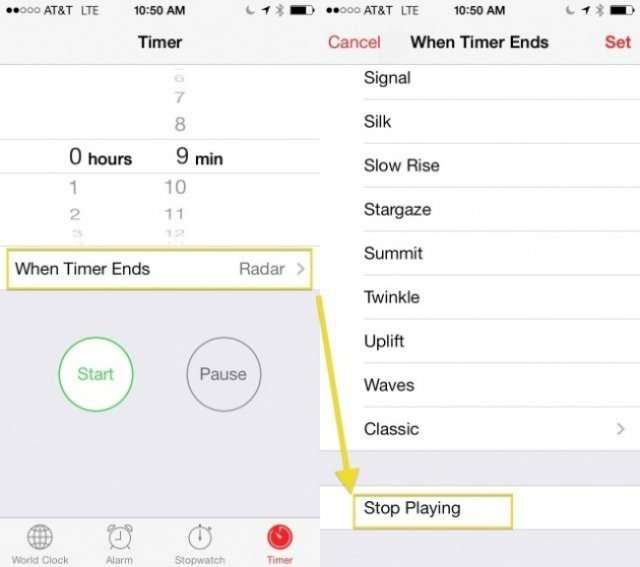
Այժմ դուք կարող եք քնելուց առաջ վայելել ձեր սիրելի երաժշտությունն առանց անհանգստանալու, որ կքնեք, և երաժշտությունը կշարունակվի ողջ գիշեր: Պարզապես հարկավոր է ձեզ անհրաժեշտ ժամանակահատվածի համար թայմեր դնել: Այդ ֆունկցիան գտնվում է ժամացույցի բաժնում: Նկարում քայլերով ցույց է տրված, թե ինչ է պետք անել:

2. Ստեղծել յուրահատուկ վիբրացիա
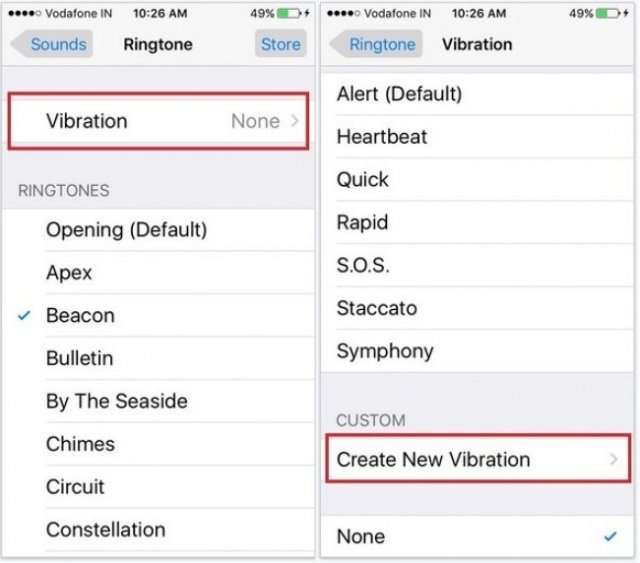
Տեքստային հաղորդագրությունների ստանդարտ վիբրացիայի տարբերակներից մեկն օգտագործելու փոխարեն դուք կարող եք ստեղծել ձերը:

Մտեք Settings-ի Sounds բաժինը և ընտրեք Create New Vibration տարբերակը:

Այնուհետև ձայնագրեք ձեր նախընտրելի ռիթմը՝ մատով հպվելով էկրանին:

3. Մաքրել RAM-ը
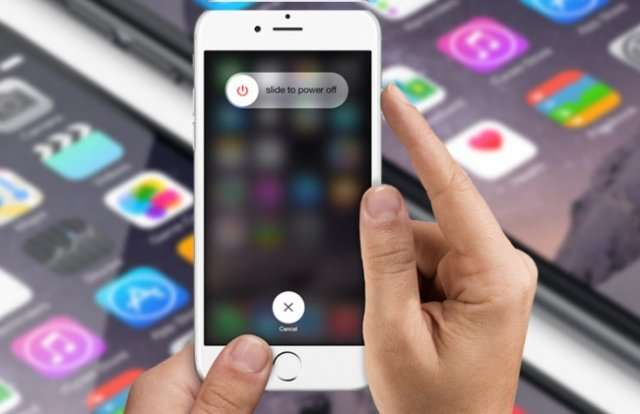
Որպեսզի ձեր iPhone-ն ավելի արագ աշխատի, դուք կարող եք մաքրել դրա RAM-ը:

Սեղմած պահեք iPhone-ի անջատման/միացման կոճակը, մինչև հայտնվի slide to power off գրությունը:

Այնուհետև սեղմեք Home կոճակը:

Որոշ ժամանակ անց ձեր Էկրանը մի պահ կլուսարձակի և հետո կվերադառնա home screen: Այդ կարճ ընթացքում ձեր iPhone-ի RAM-ը կմաքրվի:

4. Հաղորդագրության ուղարկման ճշգրիտ ժամ
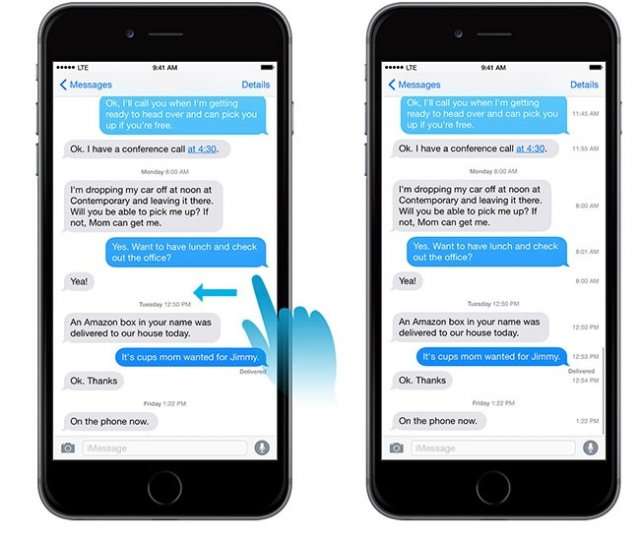
Դուք կարող եք հեշտությամբ պարզել հաղորդագրության ուղարկման ճշգրիտ ժամը: Բացեք Messages-ը և ընտրեք խոսակցություններից մեկը, ապա մատով ձախ թեքեք և կտեսնեք հաղորդագրության ուղարկման ճշգրիտ ժամը:

5. Միացնել հաղորդագրության սիմվոլները հաշվելու ֆունկցիան
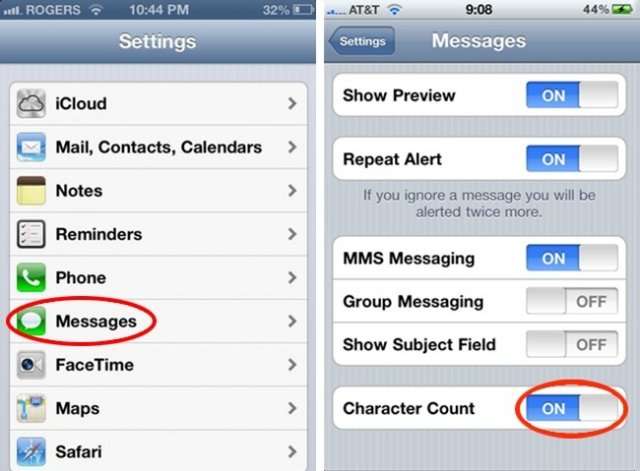
Որպեսզի հատ-հատ չհաշվեք հաղորդագրության սիմվոլները, կարող եք միացնել համապատասխան ֆունկցիան: Մտեք Settings-ի Messages բաժինը և միացրեք Character Count-ն ինչպես ցույց է տրված նկարում:

6. Lock արած էկրանով video նկարել
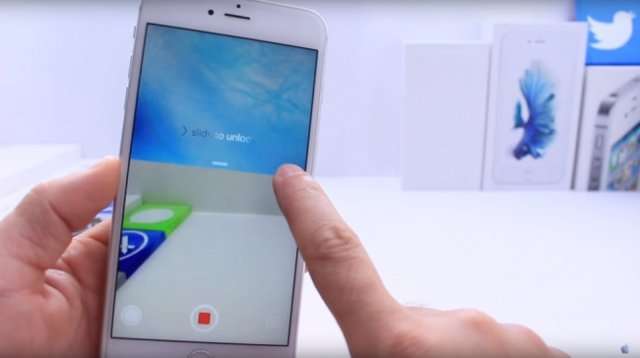
Եթե դուք ուզում եք այնպես video նկարել, որ ոչ ոք դա չնկատի, ապա արեք հետևյալ քայլերը: Lock արած վիճակում բացեք, թեքեք դեպի տեսախցիկի հատվածը և ներքևում ընտրեք video տարբերակը: Կրկնակի քլիք արեք home կոճակի վրա 3 անգամ: Անշարժ պահեք ձեր ձեռքը, մինչև էկրանն անջատվի: Կարևորը մի մոռացեք, որ դուք արդեն video նկարահանում եք անում: Դադարեցենլու համար պարզապես unlock արեք և անջատեք:

7. Աուդիո և վիդեո ձայնագրությունների հետանցման (перемотка) արագությունների փոփոխություն
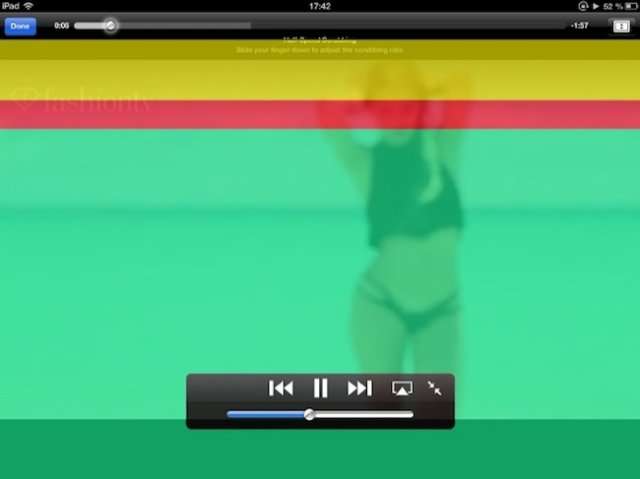
Դեղին հատվածը արագացնում է պրոցեսը, կարմիրը՝ 2 անգամ դանդաղեցնում, իսկ կանաչը էլ ավելի դանդաղ է դա իրագործում:

8. Խաղերի ժամանակ գովազդներն անջատել
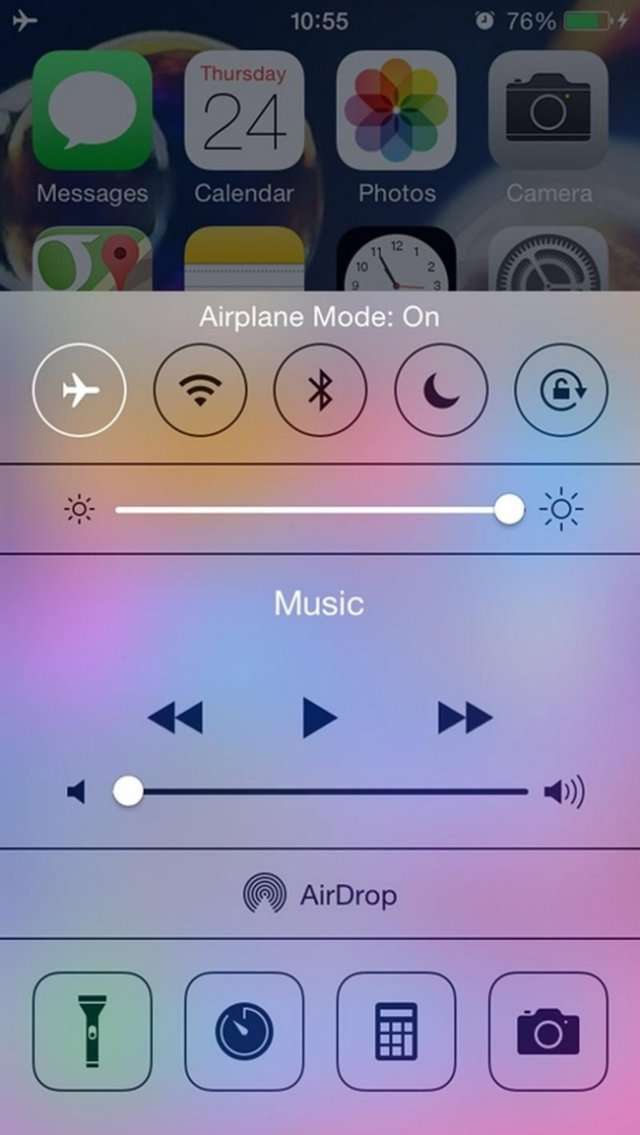
Պարզապես անցում կատարեք Airplane Mode-ի խաղալու ընթացքում, սակայն հաշվի առեք, որ որոշ ֆունկցիաներ անջատվելու են այդ ընթացքում:

9. Փոփոխել Panorama-ի ուղղությունը
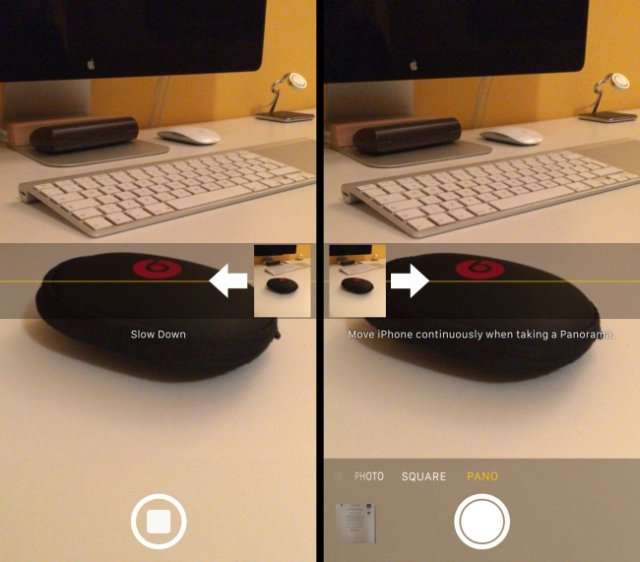
Դուք կարող եք հեշտությամբ փոխել Panorama-ի ուղղությունը՝ պարզապես հպվելով սլաքին:

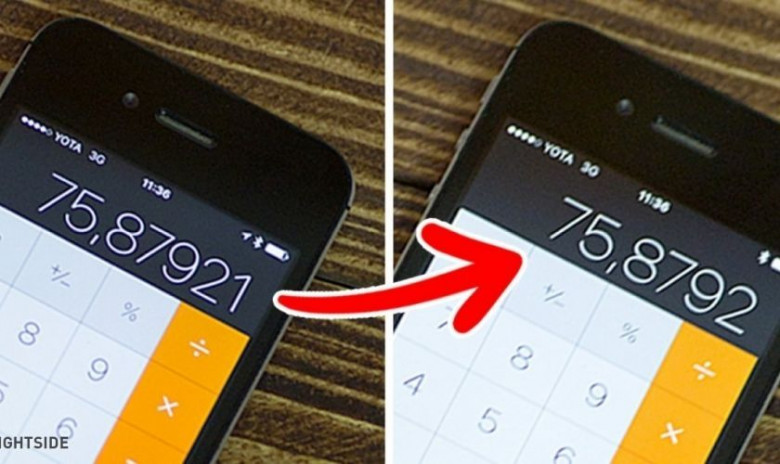
10. Ջնջել թվանշանները հաշվիչում
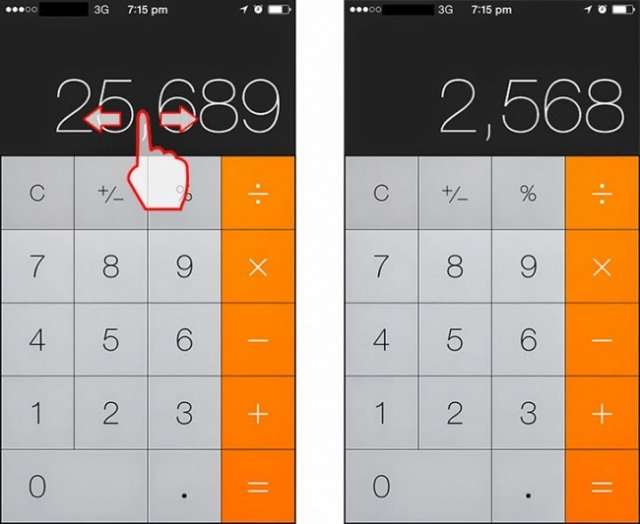
Եթե ավելորդ նիշ եք հավաքել, պարզապես մատով աջ կամ ձախ թեքեք և նիշը կջնջվի:

11. Wi-fi արագության բարձրացում
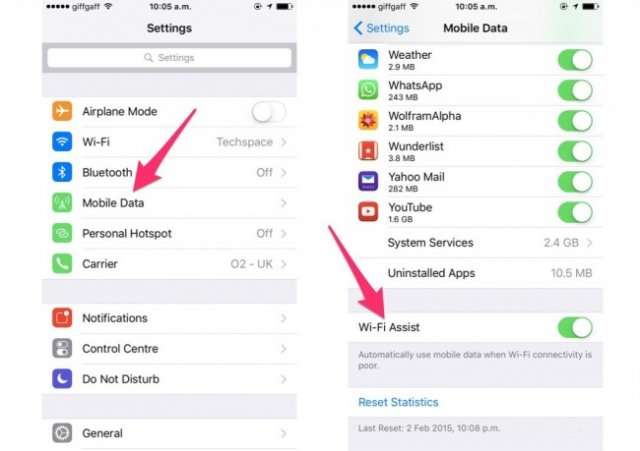
Կատարեք նկարում ցույց տրված քայլերը և մեծացրեք ձեր հեռախոսի ինտերնետի արագությունը:

12. Restart անել iPhone-ը
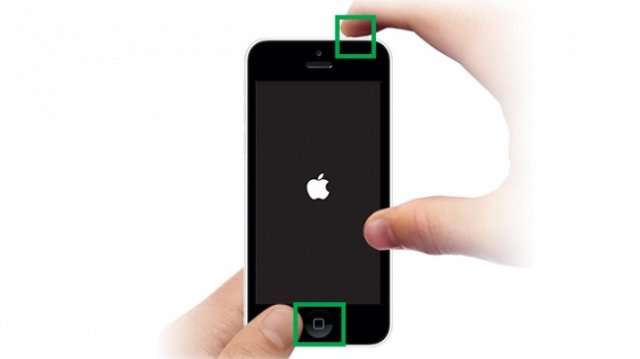
Երբեմն պատահում է, որ iPhone-ը «կախում» է: Այդ պարագայում պարզապես միաժամանակ սեղմած պահեք անջատել/միացնել և home կոճակները: Գործընթացը կարող է տևել մոտ 10 վայրկյան: Սակայն հիշեք, iPhone-ը հաճախակի restart անել չի կարելի:

Ucom Supports Coca-Cola Fest 2026 “Orran” Students Start the New Academic Year with Support from “The Power of One Dram”It is with deep awareness of the seriousness of this supposition as well as concern that we pose the question of the above headline“Armenian Virtuosos” Scholarship Recipients Take the Stage at the 4th International Festival of Youth Orchestras of the WorldUnibank Launches a New Promotion "U-Teenager": Grand Prize — a Summer Course at One of the Top Universities AbroadSEROOND Begins: Armenia’s First Authored School Model Based on Whole-Child Development, Enabled by AI"Unisport" Advances to the Main Round of the UEFA Futsal Champions League Cybersecurity Course Graduates Take Part in Ucom’s “Junior Academy” ProgramUcom Introduces Green Tariff Plans, Turning Everyday Connectivity into Environmental Impact Ucom Launches “Unity Back to School” Special Offer for the New School YearUcom’s Sales and Service Center Reopens at 7 Sayat-Nova Street in Gyumri "Unisport" Competes in the UEFA Futsal Champions LeagueAram Barseghyan Appointed CEO of Team Telecom Armenia, Hayk Yesayan to Lead Team Group Letter of Congratulations to His Holiness Karekin II on His 75th Birthday “Side by Side” Program for Artsakh Families in the Sevan Community: IDBankArega Hovsepyan is our candidate for Chair of the Committee on European IntegrationThe Final Round of the Junius Tournament Has BegunAwards Ceremony for the “Top 100 Students of Armenia” Competition: Presentation of CertificatesNew Samsung Galaxy A27 as Part of Ucom’s Special “Back to School 2026” OfferMillennials, Gen Z, or Gen Alpha: How Different Generations Prepare for the New School Year: Idram&IDBankFinancial Literacy at the Republican Center for Children and Youth Tent Camp: Idram & IDBankUnlocking the Secrets of the Financial World at ''Hayordi'' Camp with Idram&IDBankUcom Supports the Second Phase of ArmDrone’s FPV Drone Educational Program "The Power of One Dram" to "Orran" Charitable Non-Governmental OrganizationUcom and Microsoft Innovation Center’s Cybersecurity Education Program Concludes with a Mini CTF CompetitionCustomer Appreciation Day - This Time at IDBank’s “Erebuni” BranchResults of the Junius Tournament Announced: The Next Round AheadUcom Expands International Roaming Capabilities"Urgently Confirm Your Card Details": IDBank Warns of Hotel Booking ScamsMher Ananyan joins Unibank's Management Board Ucom Supports the Launch of "Remember the Animals" Educational Game Moody’s changes the outlook on IDBank’s ratings to positive IDBank Introduces the New Mastercard World Card with Exclusive Travel Benefits and a Special Launch CampaignConverse Bank and Visa expand their strategic partnership to introduce new customer solutions Ucom and FPWC Ensure Round-the-Clock Wildlife Monitoring in Gnishik Through Solar Energy Idram and IDBank Support Startups at Seaside Startup SummitIt is now possible to register in Unibank’s mobile application through imID as well“Free In-Game Bonuses”: IDBank Warns About Cyberattacks Targeting SchoolchildrenMoody's affirms Converse Bank's ratings and changes outlook to positive from stableNew Achievements in Europe: "Armenian Virtuosos" Scholarship Recipients Embark on Educational Trips to Prestigious Music AcademiesRate.Trading Platform at Seaside Startup Summit: IDBank Introduces an Innovative SolutionKhachaturian Rooftop Grand Opening Supported by IDBankUcom’s Sales and Service Center Reopens at 24/2 Shahumyan Street in Ararat Scholarship recipients of the “Armenian Virtuosos” Program participated in the Järvi Academy and Pärnu Music Festival in Estonia, representing Armenia on the international stageUcom Supports the Installation of a 15 kW Solar Power Plant at the Vayk Sports School New Financial Skills at the Davidbek Games: Idram&IDBankCashIn Services at AraratBank ATMs: Fast, Simple, and SecureUcom Sales and Service Center Reopens at 3/47 Yerevanyan Street in Yeghvard Up to 25% idcoin when purchasing Flyone flight tickets: Idram&IDBank Converse Bank Named Armenia’s Best Digital Bank for Consumers by Euromoney