Հայտնի բրաուզերը կարող է ոչ միայն էջեր ցուցադրել համացանցում, այլև անել այնպիսի բաներ, որոնք որոշ փլագիններ կարող են անել:Orer.am-ը ձեր ուշադրությանն է ներկայցնում Google Chrome-ի համար նախատեսված օգտակար խորհուրդներ ու տրյուկներ, որոնք կօգնեն ձեզ ավելին ստանալ սիրված բրաուզերից՝ չօգտագործելով ոչ մի ընդլայնումներ:1. Պահպանել վեբ էջերը PDF-ում
Google Chrome-ն ունի ներդրված PDF-պրինտեր: Բացեք ցանկացած էջ, սեղմեք Ctrl + P Windows-ում (կամ Cmd + P OS X-ում) ու ընտրեք «Պահպանել ինչպես PDF», որպեսզի էջը կարողանաք բեռնել PDF փաստաթղթի տեսքով:
2. Տեղադրել ստեղնաշարի օգտատիրական համադրություն
Google Chrome-ը ունի բազմաթիվ ստեղնաշարային համադրություններ, որոնք դուք կարող եք ոչ միայն փոփոխել, այլևս ստեղծել ձեր սեփական «թեժ ստեղները» Chrome հավելվածների գործարկման համար:
3. Ընտրողաբար մաքրել այցելված կայքերի պատմությունը
Google Chrome-ի պատմությունը (chrome://history) չունի «Ընտրել բոլորը» կետը, ու որպեսզի հեռացնեք, օրինակ՝ 20 այցելված էջերը, ձեզ հարկավոր է նշել բոլորը կետերով: Սակայն եթե նշեք առաջին տարրը ու ապա պահելով Shift-ը, քլիք անեք ձեզ անհրաժեշտ չեքբոքսի վրա, կնշվեն նրանց միջև առկա բոլոր տարրերը:
4. Տեղադրել ընդլայնումներ ոչ Chrome-ի խանութից
Բրաուզերի վերջին վարկածը թույլ չի տալիս տեղադրել կողմնակի ընդլայնումներ, որոնք ստուգումներ չեն անցել Chrome խանութում: Դա կարելի է շրջանցել՝ դիտարկիչի մենյուում միացնելով դրա ստեղծողի ռեժիմն ու մկնիկով քաշել ընդլայնման CRX ֆայլը դեպի դիտարկիչի պատուհան:
5. Արագացնել արգելակող Chrome-ը
Google Chrome-ը կարող է սկսել արգելակվել անդադար սյորֆինգից մի քանի ժամ անց: Ամենահասարակ լուծումը դիտարկիչի վերաբեռումն է, սակայն երբեմն խնդիրը ոչ թե հենց դիտարկիչի մեջ է, այլ կոնկրետ հավելվածի: Մեղավորին ավելի հստակ կօգնի հայտնաբերել հետևյալ մենյուն՝ «Գործիքներ» ⇒ «Խնդիրների դիսսպետչեր»: Տեսակավորելով ցանկը «Հիշողոթյուն» դաշտով, հնարավոր է արագորեն գտնել «արգելակը»:
6. Փոխել ձեր ընթացիկ գտնվելու վայրը
Որոշ կայքեր կարող են հարցնել ձեր աշխարհագրական դիրքը: Դուք կարող եք ոչ միայն հրաժարվել հայտնել այն, այլև կեղծել: Դրա համար բացեք «Գործիքներ» մենյուն ⇒ «Ստեղծողի գործիքներ», ապա սեղմեք Esc կոճակը, որպեսզի բացեք կոնսոլը: Ընտրեք Emulation հավելվածը -> Sensors ու գրեք ցանկացած տեղավայր:
7. Կարդալ ձեր գաղտնագրերը, որ թաքնված են աստղանիշների տակ
Google Chrome-ը կարող է հիշել կայքերում գրանցման համար ավտորիզացիայի տվյալները, սակայն լռեցնելու դեպքում ծածկագրերը փակվում են աստղերով: Սակայն դրանք հնարավոր է գաղտնազերծել՝ բացելով «Ստեղծողի գործիքները», ընտրելով էջին գաղտնագրի դաշտը ու դաշտի տիպը փոխելով Password-ից Text-ի: Այլըտրանքային եղանակ է գտնել անհրաժեշտ ծածկագիրը chrome://settings/passwords-ում:
8. Նամակ գրել միանգամից հասցեական տողում
mailto թիմը հասցեատիրոջ նշումով (օրինակ՝ mailto:recipient@domain.com) կբացի պատուհան Gmail-ում նամակ գրելու համար ու ավտոմատ կերպով հասցեն կներկայացնի «Ում» դաշտում:
9. Նշումներ կատարել Chrome-ում
Հաջորդ փոքրիկ հաքը JavaScript-ում վայրկենապես ձեր Chrome-ը կվերածի տեքստային խմբագրի: Բացեք նոր ներդիր, հասցեի տողում տեղադրեք հետևյալը՝ data:text/html, <html contenteditable>: Կուրսորը դրեք ներդիրի մեջ ու սկսեք հավաքել տեսքտը:
10. Օգտագործել Chrome-ը՝ որպես մեդիանվագարկիչ
Ուղղակի քաշեք աուդիո ու վիդեոֆայլերը, նկարները, տեքստային ֆայլերը, PDF փաստաթղթերը լոկալ սկավառակից Google Chrome-ի պատուհան:
11. Տեղավորել ավելի շատ էջեր պանելի վրա
Բավական հայտնի հաք է: Դիտարկիչի վրայից հեռացրեք կայքի անվանումը՝ թողնելով միայն կայքի նշանը, որը իր մասին լավ տեղեկություններ կհաղորդի առանց այդ գրառման էլ:
12. Բարձրացնել կայունությունը՝ բեռնելով Flash-ը միայն անհրաժեշտության դեպքում
HTML5-ը վաղուց ու հաջողությամբ դուրս է մղում Adobe Flash Player-ը:
13. Ներկայանալ որպես բջջային սարք դանդաղ ինտերնետ-միացման դեպքում
Եթե հայտնվել եք թույլ համացանցում կամ խիստ սահմանափակ թրաֆիկի պայմաններում, դիտարկիչը կարող է իրեն դնել բջջային սարքի տեղ ու կայքերի մեծ մասը ձեզ կփոխանցեն իրենց բջջային վարկածները, որը սովորաբար ավել քիչ պահանջկոտ է ռեսուրսների նկատմամբ:
14. Հավաքել «ամաչեցնող» հղումները հասցեների տողից
Եթե որոշ հղումներներ ցանկանում եք հեռացնել, պարտադիր չէ հեռացնել դրանք դիտարկիչի պատմության մեջ, պարզապես անհրաժեշտ հղումը առանձնացրեք ու սեղմեք Shift + Delete, որպեսզի այն ընդմիշտ հեռացնեք:
15. Նայել էջը Google-ի կեշից
Google կեշը դառնում է անփոխարինելի, երբ ձեզ հարկավոր կայքը գնացել է օֆլայն ու անհասանելի է:



 Google Chrome-ն ունի ներդրված PDF-պրինտեր: Բացեք ցանկացած էջ, սեղմեք Ctrl + P Windows-ում (կամ Cmd + P OS X-ում) ու ընտրեք «Պահպանել ինչպես PDF», որպեսզի էջը կարողանաք բեռնել PDF փաստաթղթի տեսքով:
2. Տեղադրել ստեղնաշարի օգտատիրական համադրություն
Google Chrome-ն ունի ներդրված PDF-պրինտեր: Բացեք ցանկացած էջ, սեղմեք Ctrl + P Windows-ում (կամ Cmd + P OS X-ում) ու ընտրեք «Պահպանել ինչպես PDF», որպեսզի էջը կարողանաք բեռնել PDF փաստաթղթի տեսքով:
2. Տեղադրել ստեղնաշարի օգտատիրական համադրություն
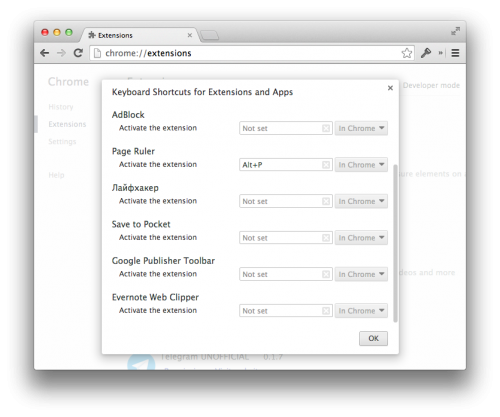 Google Chrome-ը ունի բազմաթիվ ստեղնաշարային համադրություններ, որոնք դուք կարող եք ոչ միայն փոփոխել, այլևս ստեղծել ձեր սեփական «թեժ ստեղները» Chrome հավելվածների գործարկման համար:
3. Ընտրողաբար մաքրել այցելված կայքերի պատմությունը
Google Chrome-ը ունի բազմաթիվ ստեղնաշարային համադրություններ, որոնք դուք կարող եք ոչ միայն փոփոխել, այլևս ստեղծել ձեր սեփական «թեժ ստեղները» Chrome հավելվածների գործարկման համար:
3. Ընտրողաբար մաքրել այցելված կայքերի պատմությունը
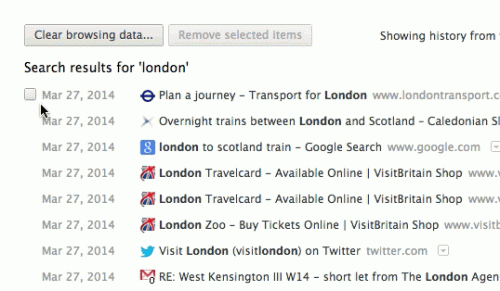 Google Chrome-ի պատմությունը (chrome://history) չունի «Ընտրել բոլորը» կետը, ու որպեսզի հեռացնեք, օրինակ՝ 20 այցելված էջերը, ձեզ հարկավոր է նշել բոլորը կետերով: Սակայն եթե նշեք առաջին տարրը ու ապա պահելով Shift-ը, քլիք անեք ձեզ անհրաժեշտ չեքբոքսի վրա, կնշվեն նրանց միջև առկա բոլոր տարրերը:
4. Տեղադրել ընդլայնումներ ոչ Chrome-ի խանութից
Բրաուզերի վերջին վարկածը թույլ չի տալիս տեղադրել կողմնակի ընդլայնումներ, որոնք ստուգումներ չեն անցել Chrome խանութում: Դա կարելի է շրջանցել՝ դիտարկիչի մենյուում միացնելով դրա ստեղծողի ռեժիմն ու մկնիկով քաշել ընդլայնման CRX ֆայլը դեպի դիտարկիչի պատուհան:
5. Արագացնել արգելակող Chrome-ը
Google Chrome-ի պատմությունը (chrome://history) չունի «Ընտրել բոլորը» կետը, ու որպեսզի հեռացնեք, օրինակ՝ 20 այցելված էջերը, ձեզ հարկավոր է նշել բոլորը կետերով: Սակայն եթե նշեք առաջին տարրը ու ապա պահելով Shift-ը, քլիք անեք ձեզ անհրաժեշտ չեքբոքսի վրա, կնշվեն նրանց միջև առկա բոլոր տարրերը:
4. Տեղադրել ընդլայնումներ ոչ Chrome-ի խանութից
Բրաուզերի վերջին վարկածը թույլ չի տալիս տեղադրել կողմնակի ընդլայնումներ, որոնք ստուգումներ չեն անցել Chrome խանութում: Դա կարելի է շրջանցել՝ դիտարկիչի մենյուում միացնելով դրա ստեղծողի ռեժիմն ու մկնիկով քաշել ընդլայնման CRX ֆայլը դեպի դիտարկիչի պատուհան:
5. Արագացնել արգելակող Chrome-ը
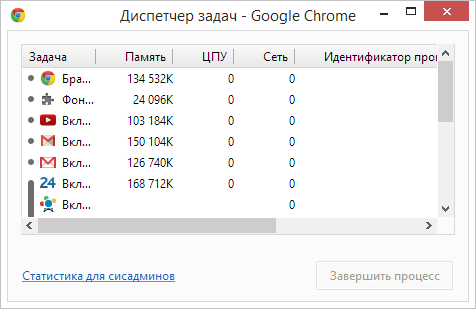 Google Chrome-ը կարող է սկսել արգելակվել անդադար սյորֆինգից մի քանի ժամ անց: Ամենահասարակ լուծումը դիտարկիչի վերաբեռումն է, սակայն երբեմն խնդիրը ոչ թե հենց դիտարկիչի մեջ է, այլ կոնկրետ հավելվածի: Մեղավորին ավելի հստակ կօգնի հայտնաբերել հետևյալ մենյուն՝ «Գործիքներ» ⇒ «Խնդիրների դիսսպետչեր»: Տեսակավորելով ցանկը «Հիշողոթյուն» դաշտով, հնարավոր է արագորեն գտնել «արգելակը»:
6. Փոխել ձեր ընթացիկ գտնվելու վայրը
Որոշ կայքեր կարող են հարցնել ձեր աշխարհագրական դիրքը: Դուք կարող եք ոչ միայն հրաժարվել հայտնել այն, այլև կեղծել: Դրա համար բացեք «Գործիքներ» մենյուն ⇒ «Ստեղծողի գործիքներ», ապա սեղմեք Esc կոճակը, որպեսզի բացեք կոնսոլը: Ընտրեք Emulation հավելվածը -> Sensors ու գրեք ցանկացած տեղավայր:
7. Կարդալ ձեր գաղտնագրերը, որ թաքնված են աստղանիշների տակ
Google Chrome-ը կարող է հիշել կայքերում գրանցման համար ավտորիզացիայի տվյալները, սակայն լռեցնելու դեպքում ծածկագրերը փակվում են աստղերով: Սակայն դրանք հնարավոր է գաղտնազերծել՝ բացելով «Ստեղծողի գործիքները», ընտրելով էջին գաղտնագրի դաշտը ու դաշտի տիպը փոխելով Password-ից Text-ի: Այլըտրանքային եղանակ է գտնել անհրաժեշտ ծածկագիրը chrome://settings/passwords-ում:
8. Նամակ գրել միանգամից հասցեական տողում
mailto թիմը հասցեատիրոջ նշումով (օրինակ՝ mailto:recipient@domain.com) կբացի պատուհան Gmail-ում նամակ գրելու համար ու ավտոմատ կերպով հասցեն կներկայացնի «Ում» դաշտում:
9. Նշումներ կատարել Chrome-ում
Հաջորդ փոքրիկ հաքը JavaScript-ում վայրկենապես ձեր Chrome-ը կվերածի տեքստային խմբագրի: Բացեք նոր ներդիր, հասցեի տողում տեղադրեք հետևյալը՝ data:text/html, <html contenteditable>: Կուրսորը դրեք ներդիրի մեջ ու սկսեք հավաքել տեսքտը:
10. Օգտագործել Chrome-ը՝ որպես մեդիանվագարկիչ
Ուղղակի քաշեք աուդիո ու վիդեոֆայլերը, նկարները, տեքստային ֆայլերը, PDF փաստաթղթերը լոկալ սկավառակից Google Chrome-ի պատուհան:
11. Տեղավորել ավելի շատ էջեր պանելի վրա
Բավական հայտնի հաք է: Դիտարկիչի վրայից հեռացրեք կայքի անվանումը՝ թողնելով միայն կայքի նշանը, որը իր մասին լավ տեղեկություններ կհաղորդի առանց այդ գրառման էլ:
12. Բարձրացնել կայունությունը՝ բեռնելով Flash-ը միայն անհրաժեշտության դեպքում
Google Chrome-ը կարող է սկսել արգելակվել անդադար սյորֆինգից մի քանի ժամ անց: Ամենահասարակ լուծումը դիտարկիչի վերաբեռումն է, սակայն երբեմն խնդիրը ոչ թե հենց դիտարկիչի մեջ է, այլ կոնկրետ հավելվածի: Մեղավորին ավելի հստակ կօգնի հայտնաբերել հետևյալ մենյուն՝ «Գործիքներ» ⇒ «Խնդիրների դիսսպետչեր»: Տեսակավորելով ցանկը «Հիշողոթյուն» դաշտով, հնարավոր է արագորեն գտնել «արգելակը»:
6. Փոխել ձեր ընթացիկ գտնվելու վայրը
Որոշ կայքեր կարող են հարցնել ձեր աշխարհագրական դիրքը: Դուք կարող եք ոչ միայն հրաժարվել հայտնել այն, այլև կեղծել: Դրա համար բացեք «Գործիքներ» մենյուն ⇒ «Ստեղծողի գործիքներ», ապա սեղմեք Esc կոճակը, որպեսզի բացեք կոնսոլը: Ընտրեք Emulation հավելվածը -> Sensors ու գրեք ցանկացած տեղավայր:
7. Կարդալ ձեր գաղտնագրերը, որ թաքնված են աստղանիշների տակ
Google Chrome-ը կարող է հիշել կայքերում գրանցման համար ավտորիզացիայի տվյալները, սակայն լռեցնելու դեպքում ծածկագրերը փակվում են աստղերով: Սակայն դրանք հնարավոր է գաղտնազերծել՝ բացելով «Ստեղծողի գործիքները», ընտրելով էջին գաղտնագրի դաշտը ու դաշտի տիպը փոխելով Password-ից Text-ի: Այլըտրանքային եղանակ է գտնել անհրաժեշտ ծածկագիրը chrome://settings/passwords-ում:
8. Նամակ գրել միանգամից հասցեական տողում
mailto թիմը հասցեատիրոջ նշումով (օրինակ՝ mailto:recipient@domain.com) կբացի պատուհան Gmail-ում նամակ գրելու համար ու ավտոմատ կերպով հասցեն կներկայացնի «Ում» դաշտում:
9. Նշումներ կատարել Chrome-ում
Հաջորդ փոքրիկ հաքը JavaScript-ում վայրկենապես ձեր Chrome-ը կվերածի տեքստային խմբագրի: Բացեք նոր ներդիր, հասցեի տողում տեղադրեք հետևյալը՝ data:text/html, <html contenteditable>: Կուրսորը դրեք ներդիրի մեջ ու սկսեք հավաքել տեսքտը:
10. Օգտագործել Chrome-ը՝ որպես մեդիանվագարկիչ
Ուղղակի քաշեք աուդիո ու վիդեոֆայլերը, նկարները, տեքստային ֆայլերը, PDF փաստաթղթերը լոկալ սկավառակից Google Chrome-ի պատուհան:
11. Տեղավորել ավելի շատ էջեր պանելի վրա
Բավական հայտնի հաք է: Դիտարկիչի վրայից հեռացրեք կայքի անվանումը՝ թողնելով միայն կայքի նշանը, որը իր մասին լավ տեղեկություններ կհաղորդի առանց այդ գրառման էլ:
12. Բարձրացնել կայունությունը՝ բեռնելով Flash-ը միայն անհրաժեշտության դեպքում
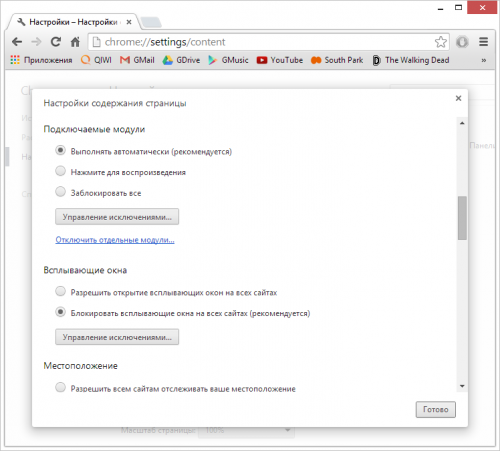 HTML5-ը վաղուց ու հաջողությամբ դուրս է մղում Adobe Flash Player-ը:
13. Ներկայանալ որպես բջջային սարք դանդաղ ինտերնետ-միացման դեպքում
Եթե հայտնվել եք թույլ համացանցում կամ խիստ սահմանափակ թրաֆիկի պայմաններում, դիտարկիչը կարող է իրեն դնել բջջային սարքի տեղ ու կայքերի մեծ մասը ձեզ կփոխանցեն իրենց բջջային վարկածները, որը սովորաբար ավել քիչ պահանջկոտ է ռեսուրսների նկատմամբ:
14. Հավաքել «ամաչեցնող» հղումները հասցեների տողից
Եթե որոշ հղումներներ ցանկանում եք հեռացնել, պարտադիր չէ հեռացնել դրանք դիտարկիչի պատմության մեջ, պարզապես անհրաժեշտ հղումը առանձնացրեք ու սեղմեք Shift + Delete, որպեսզի այն ընդմիշտ հեռացնեք:
15. Նայել էջը Google-ի կեշից
Google կեշը դառնում է անփոխարինելի, երբ ձեզ հարկավոր կայքը գնացել է օֆլայն ու անհասանելի է:
HTML5-ը վաղուց ու հաջողությամբ դուրս է մղում Adobe Flash Player-ը:
13. Ներկայանալ որպես բջջային սարք դանդաղ ինտերնետ-միացման դեպքում
Եթե հայտնվել եք թույլ համացանցում կամ խիստ սահմանափակ թրաֆիկի պայմաններում, դիտարկիչը կարող է իրեն դնել բջջային սարքի տեղ ու կայքերի մեծ մասը ձեզ կփոխանցեն իրենց բջջային վարկածները, որը սովորաբար ավել քիչ պահանջկոտ է ռեսուրսների նկատմամբ:
14. Հավաքել «ամաչեցնող» հղումները հասցեների տողից
Եթե որոշ հղումներներ ցանկանում եք հեռացնել, պարտադիր չէ հեռացնել դրանք դիտարկիչի պատմության մեջ, պարզապես անհրաժեշտ հղումը առանձնացրեք ու սեղմեք Shift + Delete, որպեսզի այն ընդմիշտ հեռացնեք:
15. Նայել էջը Google-ի կեշից
Google կեշը դառնում է անփոխարինելի, երբ ձեզ հարկավոր կայքը գնացել է օֆլայն ու անհասանելի է: